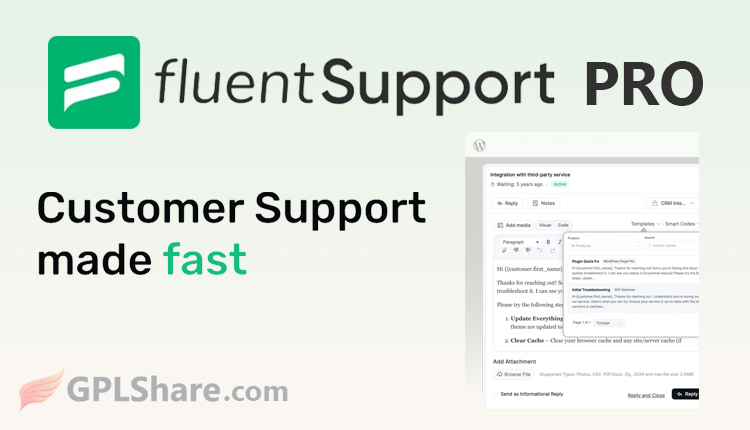

Fluent Support Pro is a WordPress-based helpdesk and customer support ticketing plugin designed to manage user complaints or inquiries directly from your website dashboard. Developed by WPManageNinja, it serves as a self-hosted alternative to third-party services like Zendesk or Freshdesk.
Why Choose the Pro Version?
While a free version is available on WordPress.org, the Pro version unlocks essential premium features such as email piping integration, advanced automation, integrations with third-party apps (like Slack, Telegram, WhatsApp, and n8n), and the ability to manage tickets across multiple websites simultaneously (cross-site ticketing).
This system is ideal for e-commerce business owners, SaaS providers, digital agencies, or online course creators looking to save on the monthly costs of external helpdesk services.
Key Features of Fluent Support Pro
The core and advanced features of Fluent Support Pro are designed to accelerate customer complaint handling directly from the WordPress dashboard. These features are categorized into the following main functions:
1. Smart Ticketing
- Lightning-Fast SPA Dashboard: Utilizes Single Page Application (VueJS) technology to load ticket data instantly without page reloads.
- Advanced Filtering & Search: Filter tickets based on priority, product, tags, assigned agent, or wait time (response delay tracking).
- Multi-Inbox Management: Manage separate support inboxes for different business lines or products within a single WordPress installation.
- Agent Collision Detection: Alerts you if two or more agents are simultaneously viewing or typing a reply to the same ticket.
- Bulk File Storage: Supports file attachments uploaded directly to WordPress storage, Dropbox, or Google Drive.
2. Automation & Workflows
- Smart Workflows: Execute automated actions—such as auto-assigning agents, applying tags, or triggering webhooks—based on specific conditions. Saved Replies/Templates: Save draft responses for frequently asked questions so agents can reply with a single click.
- Automatic Ticket Closure: The system can automatically close tickets if the customer does not respond after a specified number of days.
3. AI-Powered Features
- Automatic Ticket Summaries: AI (OpenAI & Gemini) can summarize long ticket threads, allowing new agents to quickly understand the issue.
- Sentiment Analysis: Analyzes the tone of customer language to detect whether they are angry, disappointed, or satisfied.
- Contextual Reply Suggestions: AI recommends the best draft response tailored to the content of the customer’s complaint.
4. Team & Agent Management
- Unlimited Agents: No per-user fees; you can add as many support agents as needed.
- Custom Access Rights (Agent Permissions): Set restrictions so agents can only view tickets from the categories or products assigned to them.
- Manual Time Tracking: Records the time agents spend resolving a ticket.
- Internal Notes & Mentions: Staff can discuss matters via hidden note fields and @mention other agents to request assistance.
5. Integrations & 360° Customer Profiles
- WordPress Integration: Deep integration with WooCommerce, FluentCRM, Easy Digital Downloads (EDD), FluentCart, and LMS/Membership plugins (LifterLMS, LearnDash, MemberPress).
- Complete History Profiles: When opening a ticket, agents can instantly view customer purchase data, course history, CRM tags, and past ticket history in the sidebar.
- External App Connections: Connect notifications or tickets to Slack, Telegram, WhatsApp, and Discord, as well as third-party automation tools like n8n and Zapier.
6. Analytics & Performance Reports
- Agent Performance Reports: Provides statistics on individual performance, average response times, and the number of tickets resolved.
- Activity Chart (Heatmap): Displays a visual map (GitHub-style) to track your team’s busiest days or hours for receiving tickets.
Official Pricing for Fluent Support Pro
Fluent Support Pro is offered via annual licenses on its official website, WPManageNinja. The developer is currently offering a 20% discount on the first year of purchase.
Here are the pricing details:
Single Site License (1 Domain)
- Price: $103/year (Regular price after the discount ends: $129/year)
- Features: License for 1 website, 10 business-email piping channels, unlimited email parsing, plus 1 year of plugin updates and priority support.
Agency License / Startup (5 Domains)
- Price: $199/year (Regular price after the discount ends: $249/year)
- Features: License for 5 websites, 50 business-email piping channels, unlimited email parsing, plus 1 year of plugin updates and priority support.
50 Sites License (50 Domains)
- Price: $319/year (Regular price after the discount ends: $399/year)
- Features: License for 50 websites, 500 business-email piping channels, unlimited email parsing, plus 1 year of plugin updates and priority support.
Important note: The prices listed reflect the rates at the time this article was published; prices are subject to change at any time.
At Gplshare, we offer Fluent Support Pro, allowing you to install it on multiple domains without restriction. Please note that the Pro version we provide does not support automatic updates; you will need to perform manual updates whenever the latest version becomes available on our platform.
How to Download
- Log in to your GPLShare account
- Go to your download history
- Download Fluent Support Pro v2.4.5 from the list provided
- Or download directly from this page if you have a premium membership
- That’s it! Enjoy the full version of Fluent Support Pro.
How to Install Plugin
- Please ensure that you download the
.zipfile from GPLShare - Before installing, you must first unzip the
fluent-support-pro-2.4.5-pack.zipfile - Go to WordPress Admin → Plugins → Add New → Upload Plugin
- Choose the
.zipinstaller file and click Install Now - After installation, click Activate Plugin
- Done! Fluent Support Pro is now active on your site
How to Activate License
Basically, the license credentials are not required, as they are only needed to receive updates. However, if you wish to activate the license, here are the instructions
- Once installed, navigate to the License section.
- Enter the required license credentials. (The license credentials can be found inside the package file you downloaded.)
- Done.
This product is licensed under the GPL
The GNU General Public License (GPL) is a copyleft license that guarantees you the freedom to run, study, share, and modify the software. If you distribute the software, whether modified or not, you must also pass on these same freedoms. Source: Official License Text (GPLv3) https://www.gnu.org/licenses/gpl-3.0.en.html
Conclusion & Plugin Download
GPLShare is the ultimate solution for anyone looking for a safe and trusted way to download Fluent Support Pro v2.4.5. Every product available on our platform is a 100% secure GPL License WordPress Plugin, allowing you to use it on Fluent Support Pro unlimited sites without any domain restrictions.
While we offer exclusive free download access for our premium members, we strongly advise against risking your website security by using an unsafe Fluent Support Pro nulled version from GPL markets that provide it completely free.