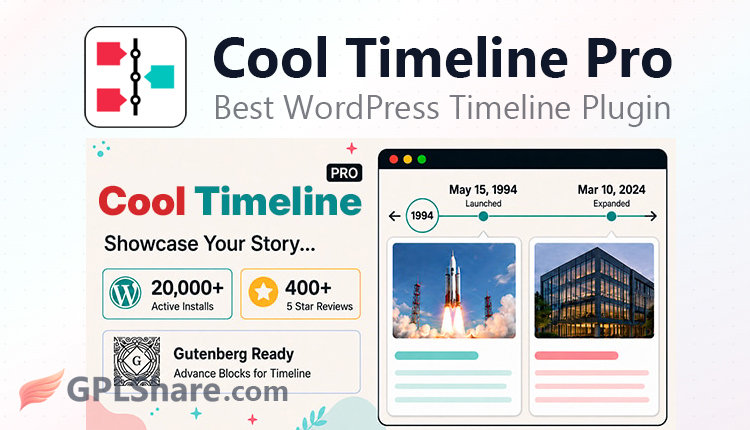

Cool Timeline Pro is a choice for web agencies because it works on its own. There is no need to rely on complicated external page builders. The plugin has a built-in import-export tool, makes it quick and simple to move timeline data from one client site to another. Just seconds are needed to transfer all the information.
If you are thinking about using the GPL version of Cool Timeline Pro to build a company history, a product roadmap or a timeline-style blog then you are in the place, this plugin is perfect, for those purposes.
As an article writer at GPLShare, I will provide information about this plugin. Cool Timeline Pro is a premium timeline plugin for WordPress created by Cool Plugins. This plugin is made to show life histories company journeys, product roadmaps or any other chronological story, in an interactive and responsive visual timeline. Cool Timeline Pro makes it easy to present time‑based content in an engaging way.
Data Architecture & Content Flexibility
This plugin doesn’t just rely on manual input, it works as a smart content query manager:
- Cool Timeline Pro creates a custom post type called “Timeline Stories.” You can manage each event just like a regular post, complete with date assignment, categories, and tags.
- Advanced capability to pull data from your standard blog posts or other custom post types. The plugin can filter posts by category or author and then automatically arrange them into a chronological timeline (both Ascending and Descending).
- If your timeline is non-traditional (for example, tutorial steps or ancient history), you can replace the standard date format with custom text (such as “Phase 1,” “Prehistoric Era,” etc.).
Cool Timeline Pro: Timeline Layout & Design Variations
So, Cool Timeline Pro actually provides more than 4 main layouts… with dozens of integrated visual styles that are fully responsive.
- Vertical Timeline for a classic two-sided (right-left) design where content is distributed evenly along a vertical center line.
- Vertical Compact for a tighter, more space-efficient vertical layout, perfect for portfolios or work history.
- Vertical One-Side for when the entire story is aligned on only one side (left or right), leaving linear space on the opposite side.
- Horizontal Timeline Slider for turning timelines into an interactive horizontal slider powered by modern libraries (like Swiper). Highly effective for homepages or corporate roadmap presentations.
Multimedia Support & Custom Design
I want every timeline point to look good so Multimedia Support & Custom Design includes multimedia meta boxes. Each story can hold one image, a slideshow gallery, a single video or embedded videos from YouTube or Vimeo.
With Vibrant MultiColor Timeline you can give each story point its own color. This helps you event types by color for example red for failures or crises and green for successful launches. With Custom Icons you can swap the dots, for FontAwesome icons that show specific event types.
Cool Timeline: System Scalability
If you have hundreds of stories in a single timeline, Cool Timeline Pro has workload optimization and User Experience (UX) mechanisms.
Ajax Load More & Pagination
Prevents page loading performance degradation by limiting the number of stories loaded initially. Subsequent stories are loaded dynamically when the user clicks a button or scrolls.
Quick Year Navigator
A quick navigation feature in the form of a floating sidebar menu that allows visitors to jump directly to a specific year (for example, jumping straight from 2026 to 2010) without the need for long manual scrolling.
Compatibility
This plugin is developed with modern code standards, making it friendly to various popular editors today such as:
- Gutenberg Native Blocks. Equipped with built-in blocks for the standard WordPress editor for easy drag-and-drop.
- Shortcode Generator & Page Builders. For users of the classic editor, Elementor, Divi, or WPBakery, this plugin provides an intuitive shortcode generator to produce custom shortcodes according to the parameters you desire.
How to Download
- Log in to your GPLShare account
- Go to your download history
- Download Cool Timeline Pro v8.0.2 from the list provided
- Or download directly from this page if you have a premium membership
- That’s it! Enjoy the full version of Cool Timeline Pro.
How to Install Plugin
- Please ensure that you download the
.zipfile from GPLShare - Before installing, you must first unzip the
cool-timeline-pro-8.0.2-pack.zipfile - Go to WordPress Admin → Plugins → Add New → Upload Plugin
- Choose the
.zipinstaller file and click Install Now - After installation, click Activate Plugin
- Done! Cool Timeline Pro is now active on your site
How to Activate License
Basically, the license credentials are not required, as they are only needed to receive updates. However, if you wish to activate the license, here are the instructions
- Once installed, navigate to the License section.
- Enter the required license credentials. (The license credentials can be found inside the package file you downloaded.)
- Done.
This product is licensed under the GPL
The GNU General Public License (GPL) is a copyleft license that guarantees you the freedom to run, study, share, and modify the software. If you distribute the software, whether modified or not, you must also pass on these same freedoms. Source: Official License Text (GPLv3) https://www.gnu.org/licenses/gpl-3.0.en.html
Conclusion & Plugin Download
GPLShare is the ultimate solution for anyone looking for a safe and trusted way to download Cool Timeline Pro v8.0.2. Every product available on our platform is a 100% secure GPL License WordPress Plugin, allowing you to use it on Cool Timeline Pro unlimited sites without any domain restrictions.
While we offer exclusive free download access for our premium members, we strongly advise against risking your website security by using an unsafe Cool Timeline Pro nulled version from GPL markets that provide it completely free.