
Product Sales Report Pro is a WordPress plugin or extension for WooCommerce. Working to overcome the limitations of WooCommerce’s built-in reporting system, this plugin gives you full control. The developer is named WP Zone or Aspen Grove Studios, but has now changed to BerryPress.
Getting to Know a Little About the BerryPress Developer
I think we need to discuss just a little about BerryPress so you know exactly who made this plugin.
The developer of this plugin, formerly WP Zone, changed its business name to BerryPress in mid-2026.
BerryPress released Ninjalytics and took over the free version’s slug in the WordPress.org directory to become version 2.0+ as a next-generation analytics platform.
Product Sales Report Pro remains supported and maintained for existing users, but the focus of new feature development is now directed to Ninjalytics, which provides an automatic import feature to move report presets from Product Sales Report Pro.
Product Sales Report Pro: Some Key Features
The main way this plugin works is by scanning the WooCommerce orders table and then compiling it into a report based on parameters. Below I will explain this
Data Filtering & Conditional Logic
Dynamic Time Range supports date presets such as today, last month, this quarter, current year, custom date ranges, and dynamic date expressions.
Order & Customer Filters filter reports based on order status such as Completed, Processing, Refunded, etc. or User Role for example separating wholesale/B2B sales from retail/guest customers.
Product & Variation Filters, this supports filtering by product ID, category, tag. Has the ability to break down product variation reports individually such as separating sales of size S, M, L on a single parent product. You can also choose to still display products that have 0 sales to monitor dead stock.
Conditional Logic & Custom Fields is a feature that can retrieve and filter data from WordPress, WooCommerce, or third-party plugin custom fields using logical operators. Examples of logical operators are equals, not equals, less than, greater than, between, and none or empty.
Column Customization, Grouping, & Sorting
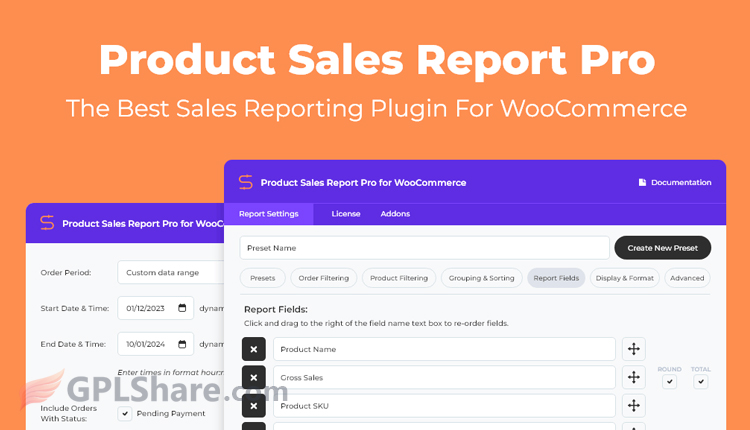
Drag-and-Drop Fields is a feature to provide freedom such as adding, removing, and rearranging the order of report columns.
Grouping & Sorting groups data based on certain attributes, sorted in ascending or descending order based on quantity sold, gross revenue, or product ID.
Export Formats & Automation
Supports 5 file formats such as CSV, XLSX, XLS, HTML, and Enhanced HTML when you download reports directly or send them via email.
You can save complex report configurations as presets. So, you can run them again in one click in the future.
Performance Optimization & Developer Settings
The database query process often triggers server timeouts if you have many products up to tens of thousands of orders, this plugin provides an Advanced settings tab to overcome this. Here are the options:
- There are settings for script execution time limit or time limit, and custom buffer size.
- There is an option to disable object caching during report generation, useful for preventing running out of RAM.
- There is a debug mode that is useful for tracking plugin conflicts and a Custom CSS column to adjust the visual appearance of HTML-formatted reports.