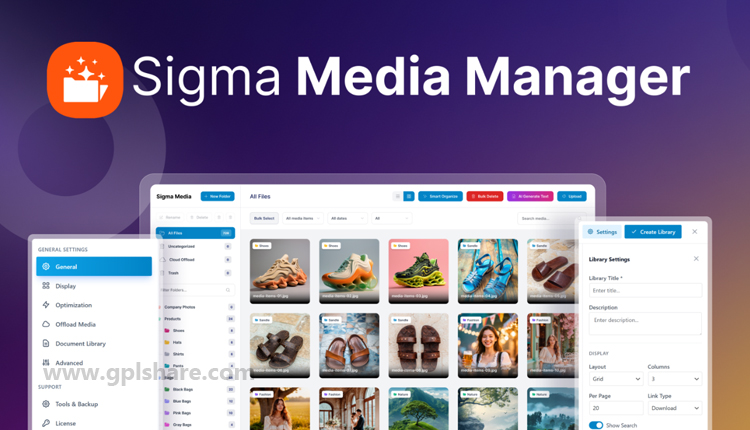

Sigma Media Manager is a WordPress media library management plugin developed by BdThemes. This plugin is designed to replace the limited built-in media management of WordPress with a faster, more structured, and feature-rich system.
Features of Sigma Media Manager
- Smart Organize (Smart Folders): This feature allows you to arrange files into folders using a Drag-and-Drop interface, making navigation through the media library much easier.
- Cloud Offload: It saves server storage space by integrating and transferring media file storage directly to cloud services like Amazon S3, DigitalOcean, or Google Cloud.
- AI Meta Generator: Equipped with artificial intelligence (AI), it can automatically generate metadata, such as alt text and titles, to assist in optimizing your images for SEO.
- Document Library: This feature helps manage, display, and organize various types of documents (like PDFs or spreadsheets) into a neat and easily accessible document library.
- Image Optimization: It includes a built-in compression feature that automatically reduces image file sizes without compromising quality, thus speeding up your website’s loading time.
- Advanced Management: This includes automatic cleanup features for unused media files, bulk selection and deletion, as well as advanced sorting filters (by date, file type, size, etc.).
How to Download
- Log in to your GPLShare account
- Go to your download history
- Download Sigma Media Manager v1.7.4 from the list provided
- Or download directly from this page if you have a premium membership
- That’s it! Enjoy the full version of Sigma Media Manager.
How to Install Plugin
- Please ensure that you download the
.zipfile from GPLShare - Before installing, you must first unzip the
sigma-media-manager-1.7.4-pack.zipfile - Go to WordPress Admin → Plugins → Add New → Upload Plugin
- Choose the
.zipinstaller file and click Install Now - After installation, click Activate Plugin
- Done! Sigma Media Manager is now active on your site
How to Activate License
Basically, the license credentials are not required, as they are only needed to receive updates. However, if you wish to activate the license, here are the instructions
- Once installed, navigate to the License section.
- Enter the required license credentials. (The license credentials can be found inside the package file you downloaded.)
- Done.
This product is licensed under the GPL
The GNU General Public License (GPL) is a copyleft license that guarantees you the freedom to run, study, share, and modify the software. If you distribute the software, whether modified or not, you must also pass on these same freedoms. Source: Official License Text (GPLv3) https://www.gnu.org/licenses/gpl-3.0.en.html
Conclusion & Plugin Download
GPLShare is the ultimate solution for anyone looking for a safe and trusted way to download Sigma Media Manager v1.7.4. Every product available on our platform is a 100% secure GPL License WordPress Plugin, allowing you to use it on Sigma Media Manager unlimited sites without any domain restrictions.
While we offer exclusive free download access for our premium members, we strongly advise against risking your website security by using an unsafe Sigma Media Manager nulled version from GPL markets that provide it completely free.