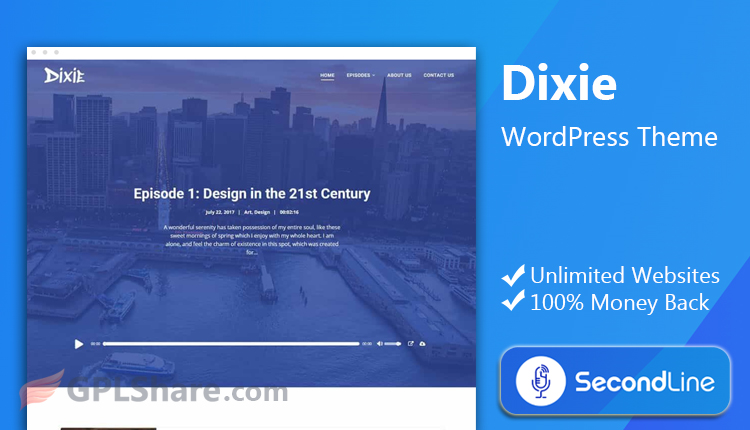

When creating a podcast website, the Dixie Theme offered by SecondLineThemes comes highly recommended for an easy start-up. The best thing about this theme is the way it works with popular plugins such as Seriously Simple Podcasting and PowerPress.
Not only does it provide versatility with its ability to play audio from self-hosted MP3 to simple embedding from sites like YouTube, SoundCloud, or Mixcloud, but it also comes with Elementor integration and custom-made add-ons which enable you to customize the theme colors and fonts without any coding knowledge.
What’s Included in the Dixie Theme by SecondLine
- Dixie has an extremely useful built-in audio player that allows you to easily create attractive episode playlists. You have the option to easily place the audio player wherever you want on your site, whether it be in your post grids or as your page header.
- Dixie makes it easy to manage your audio files. You can upload your files to your WordPress site or grab audio files from other sources and embed them using the podcast player. You can also bring in audio files from Apple Podcasts, Spotify, Libsyn, SoundCloud, MixCloud, or YouTube.
- Building an audience takes trust and that’s why Dixie comes with built in “About Us” and “Show Hosts” templates. These templates allow you to easily create pages that give your audience a behind the scenes look at the staff members of your podcast. These pages can include staff member bios and various social media links.
Layout & Visual Customization
Right out of the box, Dixie offers multiple display formats. With this theme, you can showcase episodes using a traditional 1-column list, a 2-to-6 column grid, a dynamic Masonry style, or an interactive Episode Slider.
For an optimal user experience, Dixie supports three different pagination styles. The theme allows users to choose from numbered pages, a “Load More” button, or infinite scroll.
You can adjust your site to complement your brand in just a few clicks. With this theme, you can choose from unlimited color schemes and over 900 Google fonts to edit your site typography and color scheme.
Plugin Compatibility & Integrations
Dixie works great with everything in the wider WordPress ecosystem. It links your audio to your site with the tools you already use and love. It’s compatible with:
- All major podcast plugins: It works great with Seriously Simple Podcasting, PowerPress, Simple Podcast Press, and more. You can also use SecondLine’s Podcast Importer to synchronize your RSS feed and catalog.
- Code-free page builders: Work with Elementor? Gutenberg? Both are supported! And Dixie offers custom-made Elementor widgets to speed up your Elementor workflow even more!
- Built in e-commerce support: Selling merch or other items? The theme is fully integrated with WooCommerce!
- Global & Multilingual Ready: Easily create a multilingual podcast with Dixie, as it is fully translation-ready and supports plugins like WPML and Loco Translate.
How to Download
- Log in to your GPLShare account
- Go to your download history
- Download SecondLine Dixie v1.6.6 from the list provided
- Or download directly from this page if you have a premium membership
- That’s it! Enjoy the full version of SecondLine Dixie.
How to Install Theme
- Please ensure that you download the
.zipfile from GPLShare - Before installing, you must first unzip the
dixie-secondline-1.6.6-pack.zipfile - Go to WordPress Admin → Appearance → Themes → Add New → Upload Theme
- Choose the
.ziptheme installer file and click Install Now - After installation, click Activate Theme
- Done! SecondLine Dixie is now active on your site
How to Activate License
Basically, the license credentials are not required, as they are only needed to receive updates. However, if you wish to activate the license, here are the instructions
- Once installed, navigate to the License section.
- Enter the required license credentials. (The license credentials can be found inside the package file you downloaded.)
- Done.
This product is licensed under the GPL
The GNU General Public License (GPL) is a copyleft license that guarantees you the freedom to run, study, share, and modify the software. If you distribute the software, whether modified or not, you must also pass on these same freedoms. Source: Official License Text (GPLv3) https://www.gnu.org/licenses/gpl-3.0.en.html
Conclusion & Theme Download
GPLShare is the ultimate solution for anyone looking for a safe and trusted way to download SecondLine Dixie v1.6.6. Every product available on our platform is a 100% secure GPL License WordPress Theme, allowing you to use it on SecondLine Dixie unlimited sites without any domain restrictions.
While we offer exclusive free download access for our premium members, we strongly advise against risking your website security by using an unsafe SecondLine Dixie nulled version from GPL markets that provide it completely free.