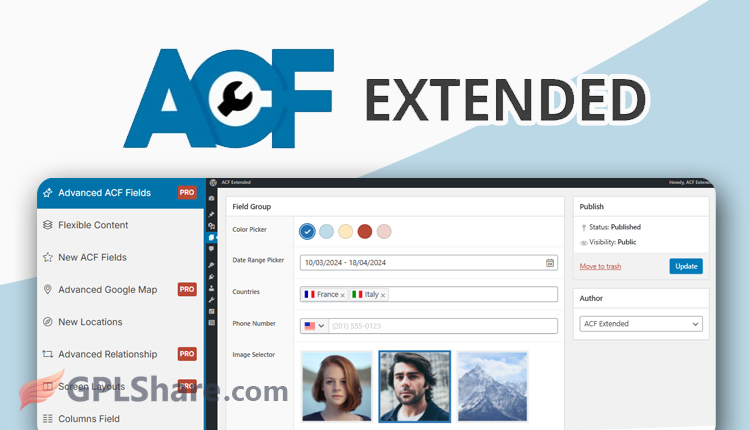

Advanced Custom Fields: Extended (ACFE) is a third-party add-on designed to extend and enhance the built-in features of the Advanced Custom Fields (ACF) Pro plugin. This plugin was developed by the developer community (not by the official WP Engine team, the primary owner of ACF). The core philosophy of ACF Extended is to serve as an all-in-one enhancement suite, consolidating hundreds of advanced optimizations into a single plugin so that developers do not need to install numerous separate, small add-on plugins.
Important Note: To utilize the full functionality of ACFE, you must have the main ACF Pro plugin installed on your WordPress site. This plugin cannot function on its own without the core ACF foundation.
ACF Extended (ACFE) Key Capabilities
This plugin provides much deeper control for web developers through the following 4 feature pillars:
1. Addition of Specific Field Types (New Fields)
ACFE adds over 20 new field types not available in the standard ACF Pro menu, including:
- Payment Field: Inserts a direct transaction button using Stripe or PayPal Express gateway integration.
- Google reCAPTCHA: Adds an anti-bot security validation module (v2 & v3) to data forms.
- Country & Currency Selector: Provides ready-to-use data for selecting countries, languages, or global currencies without manual entry.
- Advanced Link: A modern link selection interface featuring a pop-up (modal) window with filtering capabilities for specific post types.
2. Transforming Flexible Content into a Page Builder
ACF Pro Flexible Content feature has been significantly enhanced to become much more powerful. With ACFE, you can create a Grid System (visually arranging content columns), set up design previews (Layout Previews), and establish dynamic location rules for each component arrangement.
3. Front-End Form Management (ACF Forms)
While creating front-end data input forms typically requires extensive PHP coding, ACFE provides a Forms Manager UI. You can visually design contact forms, user registration forms, or article submission forms directly from the WordPress dashboard.
4. Developer Features & Performance Optimization
- Advanced Validation: Configure specific required rules. For example, a field might be optional when populated by an admin via the dashboard but mandatory when accessed by external website visitors.
- Force JSON Sync: Forces the system to consistently back up the entire data structure to a local encrypted file, facilitating the migration of the web architecture between local servers and live hosting environments.
- Field Visibility Settings: Hide or display specific data input fields based on user access levels (e.g., visible only to Administrators and hidden from Authors).
Like its parent plugin, ACFE is available in both Basic (Free) and Pro (Paid) versions.
How to Download
- Log in to your GPLShare account
- Go to your download history
- Download Advanced Custom Fields Extended Pro v0.9.2.3 from the list provided
- Or download directly from this page if you have a premium membership
- That’s it! Enjoy the full version of Advanced Custom Fields Extended Pro.
How to Install Plugin
- Please ensure that you download the
.zipfile from GPLShare - Before installing, you must first unzip the
acf-extended-pro-0.9.2.3-pack.zipfile - Go to WordPress Admin → Plugins → Add New → Upload Plugin
- Choose the
.zipinstaller file and click Install Now - After installation, click Activate Plugin
- Done! Advanced Custom Fields Extended Pro is now active on your site
How to Activate License
Basically, the license credentials are not required, as they are only needed to receive updates. However, if you wish to activate the license, here are the instructions
- Once installed, navigate to the License section.
- Enter the required license credentials. (The license credentials can be found inside the package file you downloaded.)
- Done.
This product is licensed under the GPL
The GNU General Public License (GPL) is a copyleft license that guarantees you the freedom to run, study, share, and modify the software. If you distribute the software, whether modified or not, you must also pass on these same freedoms. Source: Official License Text (GPLv3) https://www.gnu.org/licenses/gpl-3.0.en.html
Conclusion & Plugin Download
GPLShare is the ultimate solution for anyone looking for a safe and trusted way to download Advanced Custom Fields Extended Pro v0.9.2.3. Every product available on our platform is a 100% secure GPL License WordPress Plugin, allowing you to use it on Advanced Custom Fields Extended Pro unlimited sites without any domain restrictions.
While we offer exclusive free download access for our premium members, we strongly advise against risking your website security by using an unsafe Advanced Custom Fields Extended Pro nulled version from GPL markets that provide it completely free.